You are here: PS Series Group Administration > Group Customization > Using CHAP to Control iSCSI Access to Volumes > Configuring Target Authentication
To configure the group for target authentication, in which each iSCSI target presented by the group is authenticated by the iSCSI initiator, you must first set up initiator authentication, as described in Using Local CHAP Accounts for Initiator Authentication or Using External RADIUS Servers for Initiator Authentication. Using both initiator and target authentication is called mutual authentication.
Note: Target authentication is always enabled on the group. The iSCSI initiator settings determine whether target authentication is enforced.
To display the target authentication user name and password for the group, click:
Group Configuration > iSCSI tab
The Group iSCSI window appears (Figure 13: Group iSCSI ).
In the iSCSI Authentication panel, under Target authentication, are shown the group’s default account name and password (referred to by some initiators as a "secret") required for target authentication. The password displayed here must match the information held by the iSCSI initiator.
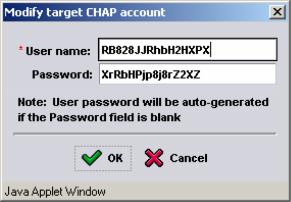
If you want to change the user name or password, click Modify. In the Modify Target CHAP Account dialog box (Figure 15: Modify Target CHAP Account ), modify the information and click OK. Passwords should include at least 12 characters, preferably random.
Figure 15: Modify Target CHAP Account