You are here: PS Series Group Administration > Group Customization > Controlling GUI and CLI Management Access
You can control whether administrators can use the Group Manager GUI or CLI to manage a group. You can also specify restrictions on those access methods.
Note: Read-only access to the group is available through SNMP if you set the community string. See Using SNMP to Monitor a Group for more information. If you do not have network access to the group, you can use a serial connection to access the group and run CLI commands. See Using the Group Manager Command Line Interface for more information.
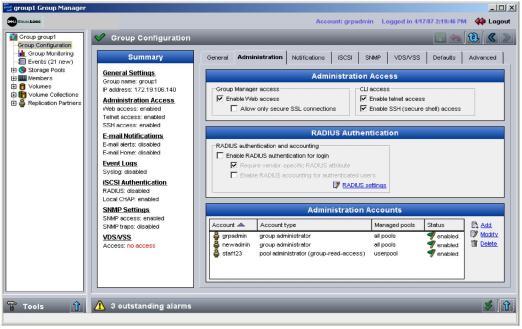
To control GUI and CLI access to the group, click:
Group Configuration > Administration tab
The Group Administration window appears (Figure 4: Group Administration ).
Figure 4: Group Administration
You can control the following access methods in the Administration Access panel:
To require encryption between a Web browser and the group, also select the checkbox next to Allow only secure SSL connections. In addition, you must download and install Java Runtime Environment (JRE), which provides SSL, and select the checkbox next to Encrypt communication in the Group Manager login dialog box (Figure 1: Group Manager Login).