You are here: PS Series Group Administration > Basic Replication > Displaying Replication Status > Displaying Inbound Replication Status
To display replication and replicas inbound from a partner to the group, click:
Replication partners > partner_name > Inbound tab
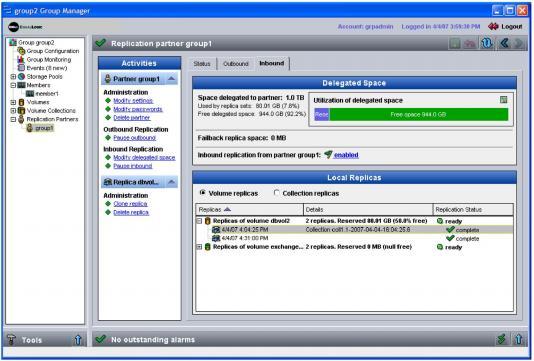
The Inbound Replication – Volume Replicas window appears (Figure 26: Inbound Replication – Volume Replicas ).
Figure 26: Inbound Replication – Volume Replicas
The Delegated Space panel shows the usage of the space that the group has delegated to the replication partner. Also shown is failback replica space, which is the total amount of space for failback replica sets associated with volumes that were previously replicating to the partner.
Note: If the space that the group has delegated to the partner is low, consider increasing the delegated space, as described in Modifying a Replication Partner.
In the Local Replicas panel, click Volume replicas to display the volumes that the partner is replicating to the group, replication details, and status. Replica status is described in Table 1: Replica Status. Replication status from the perspective of the secondary group is described in Table 3: Replication Status – Secondary Group.
Note: If replica reserve for a volume is low, on the primary group, consider increasing the replica reserve, as described in Configuring a Volume or Volume Collection for Replication.
Select a volume name in the Local Replicas panel to display related tasks in the Activities panel. For example, you can clone a replica, promote the replica set, delete a replica, or delete the replica set.
Expand a volume to show the volume replicas (the replica set). Select a replica to display related tasks in the Activities panel. For example, you can clone a replica or delete a replica.
Note: Individual replicas are identified by the date and time that the replication operation was initiated. From the perspective of the primary group, the timestamp is based on the timezone set on the primary group. However, from the perspective of the secondary group, the timestamp is based on the timezone set on the secondary group.
In the Local Replicas panel, click Collection replicas to display the volume collections that the partner is replicating to the group, as shown in Figure 27: Inbound Replication – Collection Replicas .
Figure 27: Inbound Replication – Collection Replicas
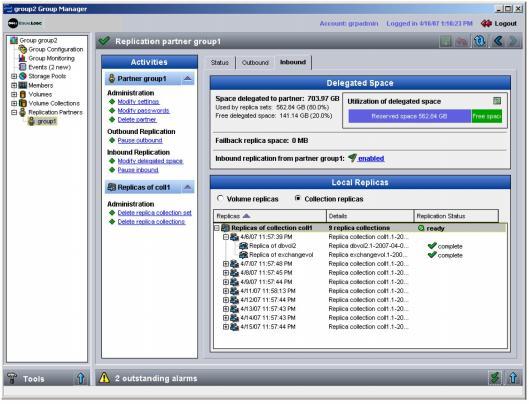
Select a volume collection to display related tasks in the Activities panel. For example, you can delete the replica collection set or an individual replica collection.
Expand a volume collection to show the replica collection set. Expand a replica collection to show the individual replicas.