You are here: PS Series Group Administration > Advanced Replication > Recovering Data on the Secondary Group > Making a Volume Demotion Permanent
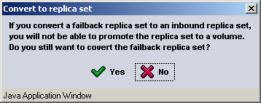
For failback purposes, you can demote a volume to a failback replica set, as described in Demoting a Volume to a Failback Replica Set. If you are switching roles in the replication configuration, you can convert a failback replica set to an inbound replica set and make the demotion permanent. This will disable the ability to promote the replica set to the original volume.
Notes: You must convert a failback replica set to an inbound replica set in order to delete it.
Before converting a failback replica set to an inbound replica set, you must change the pool in which the failback replica set resides if the current pool does not contain the space the group has delegated to the partner.
To make a volume demotion permanent, follow these steps:
Figure 34: Convert to Replica Set
The replica set will continue to appear in the Replication Partner Inbound window, but it will no longer be flagged as a failback replica set.