Modifying the Group-Wide Volume Settings
When you create a volume, the group-wide defaults for snapshot space, thin-provisioning, and iSCSI aliases are applied unless you explicitly override them. As needed, you can change the group-wide defaults.
Note: Changing the group-wide, default volume settings will affect only new volumes.
To modify the group-wide, default volume settings, click:
Group Configuration > Defaults tab
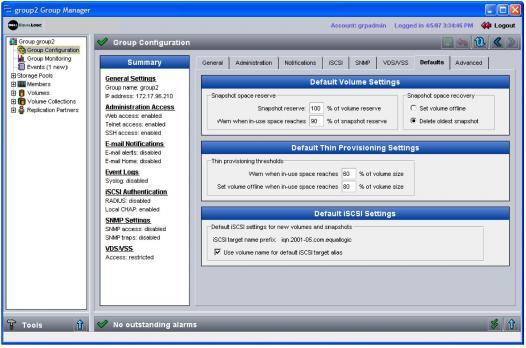
The Group Defaults window appears (Figure 19: Group Defaults ).
Figure 19: Group Defaults
In the Group Defaults window, you can modify the following default settings:
- Snapshot reserve. If you want to create snapshots of volumes, specify the amount of pool space, as a percentage of the volume reserve, to reserve for snapshots. The default is 100% of the volume reserve. If you enter a value, this space is reserved even if you never create a snapshot. If no snapshot space is reserved for a volume, snapshot creation will fail.
- Snapshot space warning limit. In the Warn when in-use space reaches field, specify the percentage of the snapshot reserve that, when consumed, results in an alarm. The default is 90%.
For example, if a volume size is 200 MB and you reserve 100% of the volume size for snapshots, using the default limit of 90%, a warning will be generated when the amount of in-use snapshot reserve reaches 180 MB.
- Snapshot space recovery policy. Select the action to take when the space reserved for snapshots has been exceeded: either delete the oldest snapshots until sufficient space is recovered (the default) or set the volume and snapshots offline. Active iSCSI connections will be terminated before a snapshot is automatically deleted.
If a snapshot deletion is imminent, you can avoid losing its data by cloning the snapshot.
- In-use space warning limit. For thin-provisioned volumes, you can change the default in-use space warning limit. When the in-use volume reserve reaches this percentage of the volume size, a warning event message is generated. The default is 60% of the volume size.
For example, if you create a thin-provisioned volume with a size of 500 GB and set the warning limit to 75%, a warning is generated when the amount of used space in the volume reaches 75% of 500 GB, or 375 GB.
- Maximum in-user space limit. For thin-provisioned volumes, you can change the default maximum in-use space limit, which is the maximum percentage of the volume size that can be in use. The volume reserve cannot increase above this value. When in-use space reaches the maximum, the volume is set offline. The default is 100% of the volume size.
For example, if you create a thin-provisioned volume with a size of 500 GB and set the maximum in-use space limit to 90%, the volume is set offline when the amount of used space in the volume reaches 90% of 500 GB, or 450 GB.
- iSCSI target alias. If you select Use volume name for default iSCSI target alias, the iSCSI target alias (public name) for a volume or snapshot will be the same as the volume or snapshot name. If you de-select the checkbox, no alias is automatically assigned. The alias is seen on the network by some iSCSI initiators. It can be used by administrators to help identify the iSCSI target.