You are here: PS Series Group Administration > Diagnosing Problems > Monitoring Events > Monitoring Alarms and Action Items
The Group Manager GUI notifies you when an alarm occurs in the group. An alarm is an event that indicates a persistent condition in an array (for example, high temperature). Alarms enable you to detect problems before they disrupt operations. Each alarm is assigned a priority level, either warning or critical, depending on the severity of the problem.
The GUI also indicates when there is an in-progress action item that requires an administrator to complete (for example, manual replication transfer).
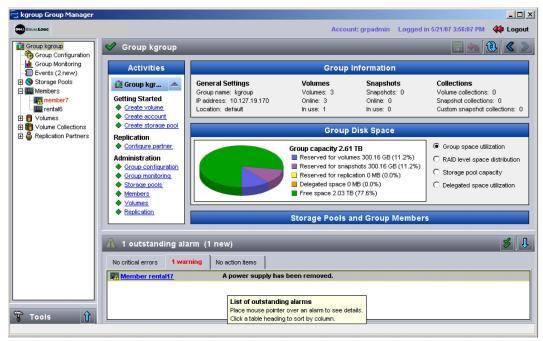
When a new alarm occurs, the Outstanding Alarms panel header, located at the bottom of each main GUI window, will flash until you click the panel and open it (Figure 2: Outstanding Alarms).
The Outstanding Alarms panel includes three tabs that show:
Each alarm entry displays the priority, the member that reported the alarm, and the message text. Place the mouse over the message text to display detailed information. You can sort the information by clicking the table headers.
Note: Alarms that correspond to member health conditions also light LEDs on the array.
|
Priority |
Description |
|---|---|
|
CRITICAL |
One or more of the following has occurred: • RAID is not functioning. • Lost block table is full. • Array temperature exceeds upper or lower limit. • Control module cache has lost data. • One or both fan trays are not installed. • Both fans on a fan tray or cooling module have failed. • Cache battery has less than 72 hours of charge or is not being charged because it exceeds the temperature limit. • NVRAM coin cell battery has failed. • Cache contains data that does not belong to any of the installed disks. • More than one valid RAID set exists in the array. • Control modules are different models. • A critical hardware component has failed. • Operations panel failed or not installed (only PS5000 arrays). • Processor that monitors array has failed (only PS5000 arrays). |
|
Priority |
Description |
|---|---|
|
WARNING |
One or more of the following has occurred: • RAID set is degraded but still functioning. • RAID (volume-level) has lost blocks. • Component temperature is near upper or lower limit. • Fan RPMs exceed upper or lower limit. • Power supply fan has failed. • Power supply is not installed or has no power. • Only one control module installed or control module has failed over. • Control module has insufficient amount of RAM. • Lock on secondary control module is open (only PS50E to PS2400E arrays). • Active control module syncing with secondary. • No communication between control modules. • Installed spare does not have enough capacity to replace a RAID set disk. • A non-critical hardware component has failed. • Real-time-clock battery is low. |
Alarms are displayed until the condition is corrected. However, the event message associated with the alarm will remain in the event log. Click the double checkmark icon in the Outstanding Alarms panel to acknowledge all alarm and turn off bolding of any outstanding alarm messages.
Action items are displayed until you complete the task indicated.
Close the Outstanding Alarms panel by clicking the header.