You are here: PS Series Group Administration > Introduction > PS Series Groups
A PS Series group is an iSCSI SAN comprised of one or more PS Series storage arrays (members) connected to an IP network and managed as a single system.
Each PS Series array has fully redundant hardware and up to three active network connections for maximum bandwidth. Integrated virtualization firmware provides:
In a single-member group, data is automatically spread across the array disks. Add more arrays to the group to expand SAN capacity and increase performance—with no disruption to users. Management overhead stays the same, regardless of SAN size.
After an array is added to a group and you choose a RAID level for the new member, the disks are automatically configured, and the space is immediately available for use. Data is spread across group members and automatically load-balanced as needed, based on capacity and performance metrics.
To access the storage space in a group, use the Group Manager graphical or command line user interface to create volumes, each of which has a size, access controls, and other attributes. A volume can be spread across multiple disks and is seen on the network as an iSCSI target.
Optionally, you can use thin provisioning to improve storage resource utilization by logically over-allocating SAN volumes. Thin provisioning enables you to satisfy current and future storage needs and eliminates the difficulty of adding storage to operating systems or applications that do not support online expansion.
A host needs only an industry-standard iSCSI initiator to access a volume in a group. Most major operating systems support an iSCSI initiator (in the form of an iSCSI driver or a host bus adapter), with a range of price and performance options. Once connected, a volume appears as a regular disk that can be formatted with the operating system’s normal utilities. Even as members are added and removed from the group, volumes continue to be accessible through the same iSCSI targets; no host modifications are necessary.
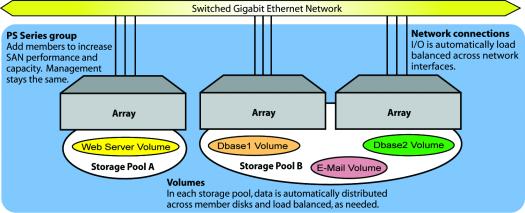
In a group, you can place all the members and volumes in a single storage pool. Or, if you have multiple members, you can create additional pools and assign members and volumes to different pools. Pools allow you to organize storage according to usage, providing more control over resource allocation, while maintaining a single system management view. You retain the advantages of storage consolidation while gaining the ability to easily segregate workloads.
Figure 1: Three-Member PS Series Group shows a three-member group with multiple storage pools.
Figure 1: Three-Member PS Series Group
For backup purposes, you can create point-in-time snapshots of volumes. You can also replicate volumes across multiple groups for a simple, yet robust disaster recovery plan. In addition, failback functionality enables you to temporarily host a volume from a replication partner and then fail back to the original replication configuration.
You can also clone volumes, snapshots, and replicas to create new volumes.