You are here: PS Series Group Administration > Member Management > Managing the Member Network Configuration > Modifying the Default Gateway
When you add a member to a group, the setup utility prompts you for the default gateway that will be used for all the member’s network interfaces.
You must specify a default gateway for a member if you want the IP addresses assigned to the member’s network interfaces to be able to communicate outside of the local network (for example, for host access to volumes).
To modify the default gateway for a member, click:
Members > member_name > Network tab
The Member Network window appears (Figure 11: Member Network ).
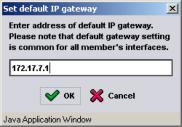
In the IP Configuration panel, click Modify next to the Default gateway field.The Set Default IP Gateway dialog box appears (Figure 13: Set Default IP Gateway ).
Figure 13: Set Default IP Gateway
Specify the default gateway in the dialog box or delete the IP address if a default gateway is not desired. Then, click OK.